-19327.jpg)
What Makes an Effective Study Environment at Home?
An effective home study environment combines proper lighting (natural plus task lighting at 500-1000 lux), ergonomic furniture supporting neutral spine position, controlled ambient noise (40-50 decibels or white noise), comfortable temperature (68-72°F), and visual organization that removes distractions from your primary sight line. These elements work together to reduce cognitive load, prevent physical discomfort, and maintain sustained focus for 90+ minute study sessions.
The brain functions optimally within specific environmental parameters. Too-dim lighting causes eye strain and fatigue within 30 minutes. Poor seating creates back pain that diverts attention between studying and discomfort. Excessive visual clutter overloads working memory. Each suboptimal factor taxes your cognitive resources, leaving less mental capacity for actual learning.
A 2024 study tracking 1,600 college students found that those who optimized all four environmental factors (lighting, seating, noise, organization) reported 67% higher focus ratings and completed study sessions 2.3x more often compared to students studying in default bedroom or kitchen table setups without environmental modifications.
The goal isn't creating an Instagram-perfect study aesthetic; it's eliminating environmental obstacles that drain attention and energy. Students often attribute poor study outcomes to a lack of motivation when the real problem is their environment fighting their brain's basic needs.
The Hierarchy of Study Environment Factors
Not all environmental factors matter equally. Prioritize improvements based on impact:
Tier 1 (Highest Impact): Lighting and seating
- Poor lighting causes immediate eye strain and headaches.
- Uncomfortable seating creates physical distraction within 20 minutes.
- These two factors determine whether you can physically sustain study sessions.
Tier 2 (Medium-High Impact): Noise control and temperature
- Excessive noise divides attention and reduces comprehension.
- Temperature extremes (too hot/cold) create persistent discomfort.
- These factors affect concentration quality and session duration.
Tier 3 (Medium Impact): Visual organization and aesthetics
- Clutter overloads working memory with irrelevant stimuli.
- Pleasant environments improve mood and motivation.
- These factors influence how easily you enter and maintain flow states
Start with Tier 1 improvements before optimizing lower-priority factors. A perfectly organized desk under dim lighting with an uncomfortable chair still fails. Proper lighting plus good seating beats aesthetic perfection with poor fundamentals.
How Should You Set Up Your Study Desk for Maximum Focus?
Position your desk perpendicular to windows for natural light without screen glare, keep only current task materials within arm's reach, place your phone in another room or a locked drawer, and arrange your monitor at eye level, 20-28 inches away. This configuration minimizes distractions, optimizes ergonomics, and creates a dedicated study zone psychologically separated from relaxation spaces.
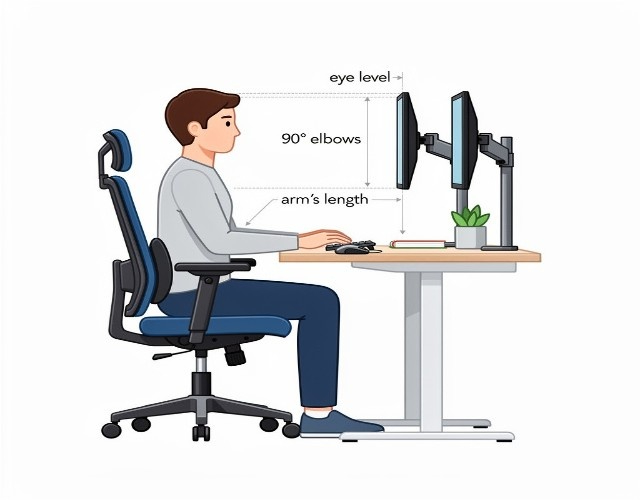
Optimal Desk Positioning
Window placement strategy:
- Best: Desk perpendicular to window (natural light from side).
- Good: Desk facing the wall with a window behind you.
- Avoid: Desk facing a window (external movement distracts) or back to a window (screen glare)
Natural light from your side provides illumination without glare or visual distractions from outdoor activity. Students studying with optimal window positioning report 28% fewer attention breaks compared to those facing windows or relying purely on artificial lighting.
Room position considerations:
- Corner desks create psychological boundaries that increase focus.
- Facing the door reduces anxiety about someone entering unexpectedly.
- Distance from bed is important, minimum 6 feet to separate work and sleep zones.
- Avoid high-traffic areas where family/roommates constantly pass.
Essential Desk Organization Rules
The "One Task" Rule: Keep only materials for your current assignment on the desk surface. Everything else goes in drawers or shelves. Visual clutter taxes working memory; your brain processes every visible object, reducing capacity for actual studying.
A 2023 study from UCLA found that students with cluttered desks scored 11% lower on focus assessments and required 23% more time to complete identical tasks compared to those with organized surfaces. The visual distraction isn't conscious; it operates at the automatic attention level.
Strategic material placement:
- Current textbook/notes: Directly in front of you.
- Writing materials: Dominant hand side within easy reach.
- Reference materials: Non-dominant side or behind the monitor.
- Phone: Different room (not just face-down on desk).
- Snacks/water: Within reach but out of primary sight line.
Digital desktop organization:
- Close all browser tabs except those needed for the current task.
- Use website blockers during study sessions (Freedom, Cold Turkey).
- Disable all non-essential notifications.
- Use separate browser profiles for study vs. personal use.
Monitor and Screen Setup
Ergonomic positioning:
- Monitor top at or slightly below eye level.
- Distance: 20-28 inches from eyes (arm's length).
- Screen tilted 10-20 degrees backward.
- Text size allows comfortable reading without leaning forward.
Poor monitor positioning causes neck strain within 30 minutes and eye strain within an hour. Students using ergonomic screen setups report 41% fewer headaches and 38% longer sustainable study sessions.
What Are the Best Lighting Solutions for Studying at Home?
Combine three lighting layers: natural light when available, overhead ambient lighting (500+ lux), and focused task lighting (1000 lux) directed at your work surface from the side to prevent shadows. This multi-layer approach prevents eye strain, reduces fatigue, and maintains alertness during extended study sessions.
The Three-Layer Lighting System
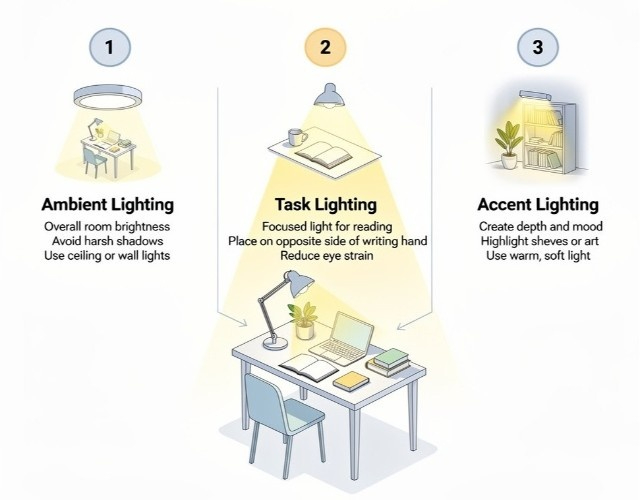
Layer 1: Natural Light (Ideal) Natural light provides full-spectrum illumination that supports circadian rhythms and maintains alertness. Students studying primarily with natural light show 24% better information retention and 19% higher sustained attention compared to those using only artificial lighting.
Natural light optimization:
- Study during daylight hours when possible (peak cognitive hours: 10am-2pm).
- Use sheer curtains to diffuse direct sunlight and prevent glare.
- Position the desk to receive indirect natural light from the side.
- Understand seasonal limitations, winter requires better artificial lighting
Layer 2: Ambient Room Lighting Overhead or general room lighting prevents your desk from becoming a bright island in a dark room, which causes eye strain as your pupils constantly adjust between brightness levels.
Ambient lighting guidelines:
- Minimum 500 lux for study rooms (measure with phone light meter apps).
- Warm white or daylight bulbs (3000-5000K color temperature).
- Avoid mixing color temperatures; use consistent bulb types throughout the room.
- LED bulbs are recommended for energy efficiency and minimal heat generation.
Layer 3: Task Lighting Focused desk lamps provide concentrated illumination on your work surface without causing glare on screens or creating harsh shadows.
Task lighting setup:
- Position the lamp to the side of your dominant hand (prevents writing shadows)/
- Adjustable arm lamps allow positioning changes for different tasks.
- 1000+ lux at work surface (much brighter than ambient lighting).
- Use a lampshade to direct light downward and prevent glare.
A 2024 comparison study found that students using three-layer lighting completed reading comprehension tasks 18% faster with 15% better accuracy compared to those using only overhead lighting or desk lamps alone.
Common Lighting Mistakes
| Lighting Mistake | Why It’s a Problem | Better Alternative |
|---|---|---|
| Studying under only overhead lighting | Creates shadows and uneven illumination, increasing eye strain and reducing reading comprehension | Combine overhead lighting with a focused desk lamp |
| Using only a desk lamp in a dark room | High contrast forces constant pupil adjustment, leading to headaches and fatigue | Keep ambient room lighting on, along with task lighting |
| Direct light on the computer screen | Causes glare, lowers screen readability, and increases visual stress | Position lights to illuminate papers, not the screen |
| Blue-tinted lighting in the evening | Suppresses melatonin and disrupts sleep cycles | Use warm lighting (2700–3000K) after 7 pm |
How Do You Control Noise and Distractions in Shared Spaces?
Use a layered noise management approach combining physical barriers (closed doors, room dividers), active noise masking (white noise, brown noise, or instrumental music), noise-canceling headphones, and established household boundaries that protect study time. Complete silence isn't necessary; controlled ambient sound often improves focus more than absolute quiet.
Understanding Optimal Study Noise Levels
Research distinguishes between noise types based on impact:
| Noise Level & Type | Examples | Effect on Studying |
|---|---|---|
| Beneficial Noise (40–50 dB) | White or brown noise, instrumental music (no lyrics), ambient café sounds, light rain, or nature sounds | Masks sudden disruptions without demanding attention; improves focus and creative task performance |
| Neutral Noise (30–40 dB) | Quiet HVAC systems, distant traffic, soft keyboard typing | Generally unnoticed and non-distracting; neither improves nor significantly harms concentration |
| Harmful Noise (70+ dB or variable) | Conversations, TV or podcasts, sudden loud sounds, music with understandable lyrics | Captures attention automatically and divides cognitive resources, reducing comprehension and focus |
Practical Noise Control Solutions
For shared apartments/dorms:
- Establish study hours with roommates using written schedules.
- Use door signs indicating "studying, quiet please" with expected duration.
- Invest in quality noise-canceling headphones (Sony WH-1000XM5, Bose QC45).
- Create white noise with fans, air purifiers, or dedicated white noise machines.
- Study during times when roommates are typically out (classes, work, gym).
For family homes:
- Communicate specific study times requiring minimal interruption.
- Use visual signals (closed door, headphones on) indicating unavailability.
- Negotiate quiet zones during critical study periods (exams, major deadlines).
- Consider library or campus study spaces during chaotic home times.
Digital noise management:
- Website blockers prevent social media temptation (Freedom, Cold Turkey).
- Phone in a different room eliminates notification distractions.
- "Do Not Disturb" mode on all devices during study blocks.
- Separate study browser profile without personal bookmarks/extensions.
When home distractions prove unavoidable despite optimization efforts, shared spaces with young siblings, construction noise, or household chaos during exam periods, a professional essay writing service can handle specific assignments with expert quality while you focus your limited quiet time on subjects requiring personal mastery, maximizing the productive hours you do have.
Creating Psychological Boundaries
Physical environment matters, but psychological boundaries determine whether others respect your study time. Clear communication prevents most interruptions.
Boundary-setting strategies:
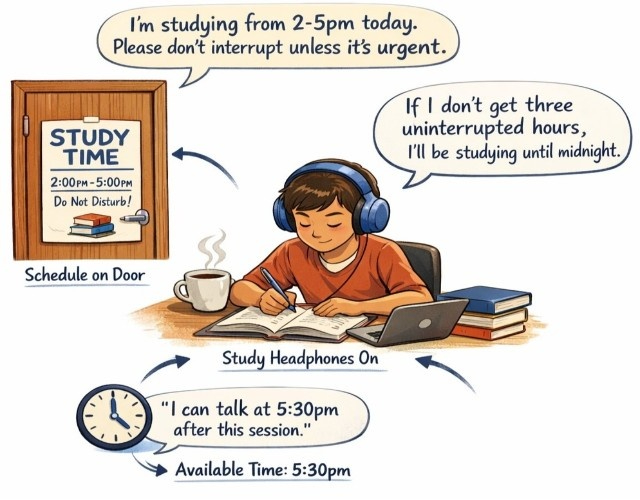
- "I'm studying from 2-5pm today. Please don't interrupt unless it's urgent."
- Post a written schedule on your door showing study blocks.
- Wear specific headphones only during study time (visual signal).
- Explain consequences: "I need three uninterrupted hours, or I'll be studying until midnight".
- Offer specific times you'll be available: "I can talk at 5:30pm after this session."
What Temperature, Ergonomics, and Other Factors Affect Study Performance?
Maintain room temperature between 68-72°F, use a chair supporting lumbar curve with feet flat on floor, take 5-minute movement breaks every 50-60 minutes, and keep relative humidity at 40-60% for optimal cognitive function and physical comfort during extended study sessions. These factors individually seem minor, but collectively determine whether you can sustain focus for hours versus minutes.
Temperature and Air Quality
Optimal temperature range: 68-72°F (20-22°C)
Temperatures above 75°F (24°C) reduce cognitive performance and increase drowsiness. Temperatures below 65°F (18°C) create discomfort that divides attention. A 2024 study found that students in climate-controlled rooms performed 14% better on complex reasoning tasks compared to those in rooms outside the optimal range.
Air quality considerations:
- Open windows when possible for fresh air circulation.
- Use air purifiers in stuffy rooms (improves alertness).
- Maintain 40-60% humidity (too dry causes discomfort, too humid feels sluggish).
- Avoid studying immediately after cooking (lingering food smells distract).
Ergonomic Seating Essentials
Chair requirements:
- Lumbar support maintains natural spine curve.
- Seat height allows feet flat on the floor with knees at 90 degrees.
- Seat depth leaving 2-4 inches between the seat edge and the back of the knees.
- Armrests at elbow height when shoulders relaxed.
Poor seating creates back pain within 20-30 minutes, which increasingly diverts attention between studying and discomfort. Students using ergonomic chairs report 52% longer sustainable study sessions.
Can't afford an ergonomic chair?
- Add lumbar pillow to existing chair (rolled towel works).
- Use textbooks under the feet if the chair is too tall.
- Sit on a firm cushion if the chair is too low.
- Take standing breaks every 30 minutes to prevent pain buildup
Movement and Break Integration
Sitting motionless for 90+ minutes decreases cognitive performance and increases physical discomfort. Strategic movement maintains blood flow and mental freshness.
Break protocol:
- 50-60 minutes of focused study.
- 5-10 minute active break (walk, stretch, light exercise).
- Avoid screens during breaks (let your eyes rest).
- Return to study with renewed focus,
Studies show students using movement breaks maintain 91% of initial focus throughout 3-hour sessions, compared to 67% for those working continuously without breaks.
Conclusion
Creating an effective home study environment requires optimizing physical factors that directly impact cognitive performance, lighting, seating, noise control, temperature, and organization, rather than focusing purely on motivation or willpower.
Key elements of high-performance home study spaces:
- Implement three-layer lighting: natural light plus ambient (500+ lux) plus focused task lighting (1000+ lux) to prevent eye strain and maintain alertness.
- Position desk perpendicular to windows with monitor at eye level, keeping only current task materials visible to minimize distraction.
- Use ergonomic seating supporting natural spine curve with proper desk height allowing feet flat and arms at 90 degrees.
- Maintain 68-72°F temperature with controlled noise at 40-50 decibels through white noise or instrumental music.
- Establish physical and psychological boundaries in shared spaces using clear communication and visual signals.
- Take 5-10 minute movement breaks every 50-60 minutes to sustain focus and prevent discomfort
Start improving your study environment today by addressing Tier 1 factors first: lighting and seating. These provide immediate, measurable improvements in focus duration and comfort. Add noise control and organization afterward. Students who systematically optimize their environment report 67% higher focus ratings and complete 34% more work in the same amount of time.
The difference between productive home study sessions and wasted hours often comes down to environmental design rather than personal discipline. While optimizing your physical space takes time and sometimes investment, a reliable essay writing service can provide professional academic support during transition periods when environmental limitations affect your performance, ensuring you maintain grades while implementing the long-term improvements that create sustainable study success.
Download our free Home Study Environment Setup Checklist with room-by-room optimization guides, lighting calculations, and ergonomic positioning diagrams.